[日本語]
This is a note that summarizes what I learned from workplace and self-study.
-
Eclipse Installation
For installation of Eclipse, please click HERE.
-
First launch
1) Start “eclipse.exe”. The path is probably as follows.
C:\eclipse-jee-2019-06\eclipse\eclipse.exe
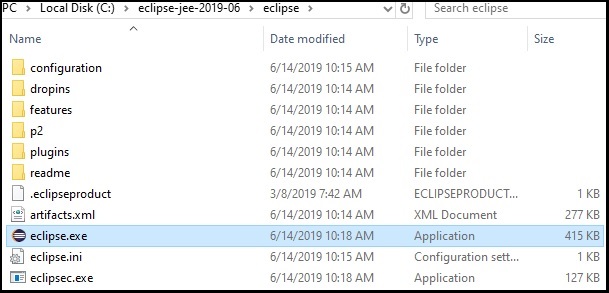
2) Confirm that the following screen is displayed. This process takes time in the first launch.

3) Select a workspace in “Select a directory as workspace” and press “Launch”. This can be chosen anywhere, but the recommended path is below.
C:\eclipse-jee-2019-06\workspace

4) Eclipse will start with the screen below. This process takes time in the first launch.

4) Startup is complete when the following screen is displayed. If you do not want to display the “Welcome” screen from the next startup, uncheck “1” and close the screen by clicking “Close” of “2”.

-
Initial setting (JRE and Compiler compliance level)
1) To set JRE, move to “Window” > “Preferences”.

2) From “Java” > “Installed JRE” check the JDK that installed on your computer and click “Apply”.

3) Go to “Java” > “Compiler” on the setting screen to set the “Compiler compliance level”.
4) Select “12” in “Compiler compliance level”. Then press “Apply and Close”.

-
Garbled characters prevention setting ① (Java Editor Text Font)
1) Move to “Window” > “Preferences”.
2) Go to “General” > “Appearance” > “Colors and Fonts”.
3) Select in “Java” > “Java Editor Text Font” and Click “Edit”.

4) Select “MS Gothic” on “Font” and press “OK”.

5) Click “Apply and close”.

-
Garbled characters prevention setting ② (Text file encoding)
1) Move to “Window” > “Preferences”.
2) Check or change “General” > “Workspace” > “Text file encoding”.
※ When developing on Windows, there is no need to change “Text file encoding”.

-
Development Environment Setup(Java Web App.)
– Work environment:
Windows 10 Home(64bit)
– Settings Contents for each step:
- Java installation
- Apache Tomcat installation
- PostgreSQL pgAdmin 4 installation
- Eclipse installation
- First launch / setting of Eclipse(Java Web App.)
– Common setting method:
20190728
 Newbie Systems Engineer's Log
7 thoughts on “First Launch / Setting of Eclipse(Java Web App.)”